Create your ReMarkSync account
Outcome: You will have a ReMarkSync account, an active 7-day free trial, and this computer activated for sync.
Your ReMarkSync account is separate from your Microsoft account. It holds your trial and subscription, while your Microsoft account is only the OneNote destination. The two emails do not need to match: you can pair one ReMarkSync account with any Microsoft account you like, personal or work/school.
Before you begin
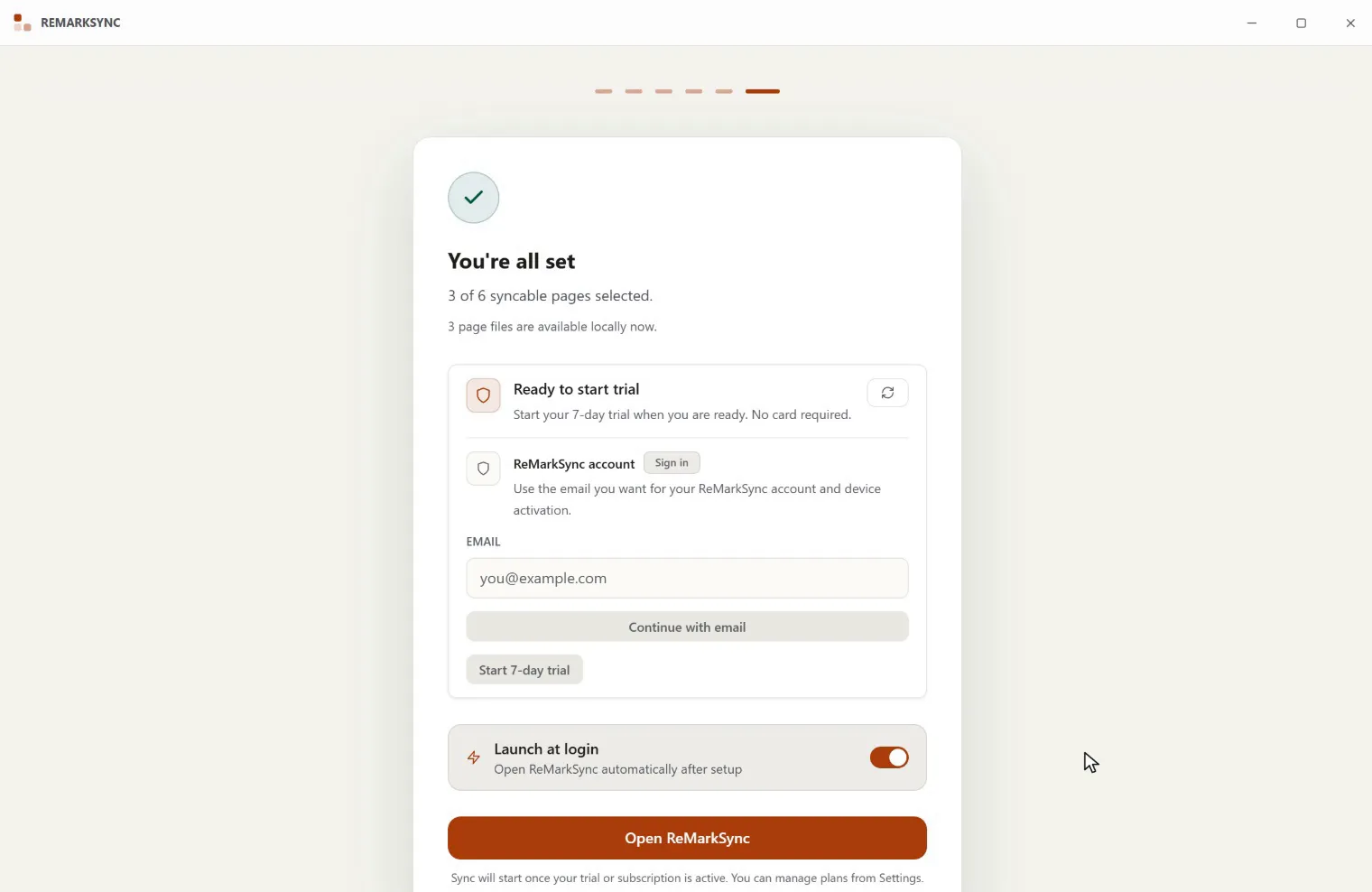
Section titled “Before you begin”- Finish the earlier setup steps so you reach the You’re all set screen, or open Settings later.
- Have access to the email inbox you want to use for your account.
Sign in with your email
Section titled “Sign in with your email”There is no password to create or remember. ReMarkSync emails you a one-time login code instead.
-
Enter the email address you want for your ReMarkSync account.
-
Select Continue with email.
-
Check your inbox for a 6-digit ReMarkSync login code.
-
Type the code and select Verify code. The code expires after 10 minutes, and Resend becomes available after one minute if the email does not arrive.
Start your 7-day free trial
Section titled “Start your 7-day free trial”Once you are signed in, the trial button becomes active. Select Start 7-day trial. No card is required.
A few access rules to know:
- One account per user. Your subscriptions and trial stay linked to this one email.
- One free trial. Each account gets a single 7-day free trial. When it ends, sync pauses until you choose a plan.
- Device activation. Signing in activates the computer you are on with your account. If this computer was already activated with a different ReMarkSync account, sign in with that original email instead of creating a second account.
- Switching Microsoft accounts is fine. Changing the OneNote destination never requires a new ReMarkSync account; your sign-in and trial carry over.
Manage your account later
Section titled “Manage your account later”The Subscription section at the top of Settings shows your trial countdown, the signed-in account, and the available plans.