WORKBOOK / INK & SKETCHES
Studio refresh
A few thoughts before we begin
 OneNoteStudio notebook
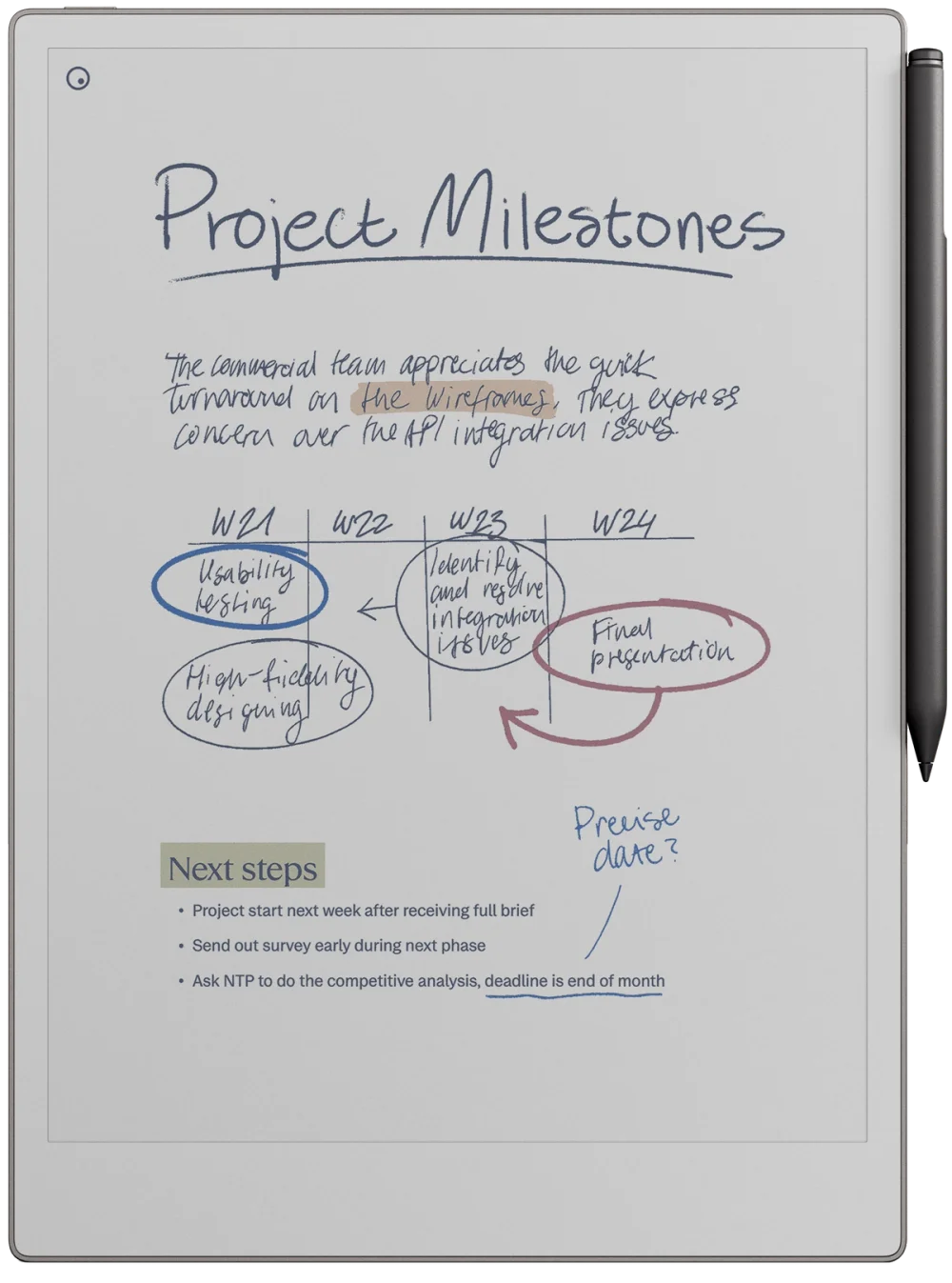
Your handwriting, sketches and ink colors come through together.
Keep writing on your reMarkable. ReMarkSync syncs your handwriting, typed text, mixed notes and annotated PDFs to OneNote.
7 days free · No card required · Trial starts in the app
Available forWindowsandmacOS
Sync runs on your computer.
All three included for Founding Members.
ReMarkSync works with the official reMarkable desktop app on your computer. See how reMarkable notes sync to OneNote, with examples of handwriting, typed notes, and annotated PDFs.
STEP 01
Keep using your reMarkable as usual. Write by hand, type notes, highlight text, and annotate PDFs.
STEP 02
The reMarkable desktop app brings each new or updated page to your computer. ReMarkSync detects the change there.
STEP 03
Each change is written to the matching OneNote page with real ink, editable text, and PDF annotations in place.
ReMarkSync never connects directly to your reMarkable. It works with the notes already synced by the official desktop app, then updates OneNote from your computer.
Architecture diagram: your usual reMarkable setup syncs through reMarkable's own sync to the official reMarkable app on your computer. ReMarkSync reads those local files, converts them, and writes to your OneNote through your Microsoft account. ReMarkSync runs on your computer. A crossed-out red path shows that no developer mode, factory reset, or SSH access is required.
ReMarkSync checks each page and skips repeat work when the note has not changed.
ReMarkSync connects through Microsoft OAuth 2.0 instead of asking for your Microsoft password.
If the app closes or the connection drops, unfinished work is recovered and tried again.
The activity timeline shows detected changes, completed updates, retries, and errors.
Ballpoint, fineliner, pencil, and marker strokes arrive as real OneNote ink, including Paper Pro custom colors.
Headings, paragraphs, bullets, numbered lists, and to-dos remain editable and searchable in OneNote.
Every original PDF page stays in place, with handwriting and highlights layered on top.
Folders become section groups, notebooks become sections, and pages stay pages in OneNote.
Choose whether a deleted page is archived, removed from OneNote, or kept there.
A status page records what ReMarkSync added, updated, archived, or removed.
Both approaches can work. Your choice comes down to what each one requires from your reMarkable, what you want to sync, and how much maintenance you want to handle yourself.
ReMarkSync
Setup you maintain
ReMarkSync
Setup you maintain
ReMarkSync
Setup you maintain
ReMarkSync
Setup you maintain
ReMarkSync
Setup you maintain
ReMarkSync
Setup you maintain
Features, setup requirements, and support vary by project.
Stories from our feedback form, shared with each person's permission.
Use ReMarkSync? Share your story(opens in a new tab)Working as a trainer, I take notes on my Remarkable and then sync to my Onenote to stay organized.
When I have a problem, they are there to resolve, I find their turn around and help fast and friendly to get me running again.
Two-way sync between OneNote and reMarkable
Included in the annual Founding Member offer when released, at no extra cost while subscribed.
Download the app, complete setup, and start the trial when you are ready. No plan or payment details are required to begin.
FOUNDING MEMBER OFFER · LAUNCH PERIOD
Then $59/year while subscribed. Under $1/week in your first year.
All included at no extra cost while subscribed.
Founding Member price while ReMarkSync is in its launch period.
30-day refund on your first annual payment
Pay month to month. Cancel anytime.
Switch to annual whenever you are ready.
Start your 7-day trial inside the app · No card required
Founding Member offer: annual plans started during the launch period cost $49 for the first year, then $59 per year while the subscription stays active. Founding Members get OneNote two-way sync and reMarkable to Obsidian when they are released; they have no release date yet. Monthly: $4.99 per month. Both plans start with a 7-day free trial, no card required. The launch period has no fixed end date. We will announce its end on this site at least 14 days before. Prices exclude VAT or sales tax where it applies; the exact total is shown at checkout.
No. ReMarkSync runs on your computer and works with notes synced by the official reMarkable desktop app. Nothing is installed on your tablet, and it does not use SSH or root access.
ReMarkSync works with the official reMarkable desktop app, which keeps a copy of your notes on your computer. reMarkable doesn’t currently offer an official way for other apps to read your notes from its cloud. Some tools connect to the reMarkable cloud directly in unofficial ways, but reMarkable’s account terms only allow its own apps, or apps it has approved, to connect, and reMarkable can close an account that breaks this rule. ReMarkSync never connects to the reMarkable cloud directly, so it never needs access to your reMarkable account.
During ordinary sync, supported handwriting arrives as editable OneNote ink with its colors intact. Typed text and lists stay editable, images carry over, and PDF annotations are layered over the document. An eligible PDF recovery copy is flattened for readability.
Yes. ReMarkSync supports personal Microsoft accounts and Microsoft 365 work or school accounts that have access to OneNote. Connect the account that owns or can access the OneNote notebook you want to use. Some work or school notebooks require a one-time “Allow OneNote access” step. Your organization may require administrator approval or block that permission; ReMarkSync will explain the next step but cannot override your organization’s policy.
Any size works from ReMarkSync v0.6.1. A4, US Letter, A5, landscape pages and 16:9 slides all keep your handwriting and highlights in place on the original PDF page. On older versions, use A4 pages for the best alignment.
No. ReMarkSync converts your notes on your computer and sends the result directly to your Microsoft account. ReMarkSync’s servers handle account, trial, and subscription status only. Diagnostic logs stay on your computer unless you choose to send them to support.
Because keeping sync working is ongoing work, and running on your computer makes that work bigger, not smaller. ReMarkSync runs on your computer, so your notes never pass through our servers. That also means every fix must ship as a signed update that works on every Windows PC and Mac, instead of being fixed once on a server. ReMarkSync also connects products we don’t control: reMarkable, OneNote, Windows, and macOS each change on their own schedule. That is why we shipped 8 updates in the first two months after launch. They added work and school accounts, support for older reMarkable pages, and safer recovery when OneNote is slow. Your subscription pays for these fixes and for support from a real person. It also keeps us honest: we only earn your renewal if sync keeps working for you. And it pays for what’s next: Founding Members get OneNote two-way sync and reMarkable to Obsidian at no extra cost when they are released. If you cancel, everything already in OneNote stays yours. Only new syncing stops.
The official reMarkable desktop app must bring new changes to your computer, and ReMarkSync must be running. Both can stay in the background. OneNote does not need to be open.
Yes. Choose individual pages, PDFs, notebooks, folders, or your entire library. Anything you leave unselected stays on your reMarkable and is not sent to OneNote.
Download ReMarkSync and complete setup. Your trial starts only when you choose to begin it in the app.
7-day free trial · No credit card requiredAvailable now for macOS and Windows
ReMarkSync is independent and not affiliated with reMarkable or Microsoft.