Article · every way compared
How to get reMarkable notes into OneNote
The answer in 20 seconds
reMarkable has no built-in OneNote option, and OneNote cannot run on the tablet. As of October 2026 you can export a PDF to OneDrive or email it and add it to OneNote by hand, or use ReMarkSync, a paid desktop app that syncs automatically and keeps your handwriting as real OneNote ink.
Export or email a PDF, then add it to OneNote. You get a picture of the page, and you repeat it after every change.
A desktop app syncs the notebooks and PDFs you choose. Handwriting arrives as real OneNote ink, PDF notes stay on top, and new pages come along.
What actually arrives in OneNote
This is the difference that matters most. The same handwritten page can arrive in three forms. Each drawing clicks the word “eggs”, so you see what you can still do with it.
- A picture of the page
Click anywhere and the whole page is selected. You can read it, but you cannot change one stroke. OneDrive export and email.
- Typed text only
The words become text you can search. Drawings, layout and the handwriting itself stay behind. Convert to text.
- Real ink you can edit
Each stroke stays a stroke, in its own color. Select one word, move it, recolor it or erase it. ReMarkSync.
The 5 ways at a glance
Four ways are free and move a copy of a page, and you repeat the steps each time. ReMarkSync keeps a notebook in OneNote up to date by itself and keeps the handwriting as ink. Open “How to do it” under any row for the steps.
ReMarkSync
Desktop app (this site)- Automatic: Yes, when notes change
- Ink: Yes, real OneNote ink
- PDFs: Yes, ink on top of the page
- Work accounts: Yes, IT may need to approve
Each timeNothing to do7 days free, then $4.99/month, or $49 the first year and $59/year after
How to do it
ReMarkSync reads the notes that the official reMarkable desktop app already brought to your computer, converts them there, and sends them to your OneNote notebook. You choose which notebooks, folders, PDFs or pages to sync.
OneDrive export
Built into reMarkable- Automatic: No, one file at a time
- Ink: No, a flat PDF
- PDFs: As a flat PDF
- Work accounts: If your IT allows it
Each timeExportInsert in OneNoteFree
How to do it
Connect OneDrive once at my.remarkable.com. Then, on the tablet, press and hold a notebook, choose Export and pick OneDrive. reMarkable saves a PDF copy there. In OneNote, insert that PDF, for example as a printout.
Keep in mind: Later edits on the tablet do not update the copy. On a Mac, OneNote inserts each PDF page as a separate picture. Some companies require IT approval before you can connect a work OneDrive.
Send by email
Built into reMarkable + Outlook- Automatic: No, one email at a time
- Ink: No, PDF or image
- PDFs: As an attachment
- Work accounts: Yes
Each timeEmailOpen in OutlookSend to OneNoteFree
How to do it
reMarkable can email a page or notebook as a PDF or an image, or as converted text. Microsoft retired the old me@onenote.com address on 26 March 2025, so mail no longer lands in OneNote by itself. Instead, open the email in Outlook and choose Send to OneNote.
Keep in mind: Microsoft lists Send to OneNote for Outlook on the web, new and classic Outlook for Windows, and Outlook for Mac, but not for Outlook 2019.
Convert to text
Built into reMarkable- Automatic: No, copy and paste
- Ink: No, typed text only
- PDFs: No
- Work accounts: Yes
Each timeConvertEmail to yourselfPasteFree
How to do it
The tablet can turn handwriting into typed text without a Connect subscription. Email the text to yourself and paste it into OneNote.
Keep in mind: Drawings, layout and the handwriting itself stay behind.
Power Automate flow
Microsoft 365 automation- Automatic: After an email or export
- Ink: No, text and images
- PDFs: As images or files
- Work accounts: Work or school only
Each timeSend or export the pageIncluded in many work plans
How to do it
If your organization uses Microsoft 365, a flow, an automation someone builds once in Power Automate, can watch a mailbox or a OneDrive folder and create OneNote pages from what arrives. You still send or export each page first.
Keep in mind: It needs a work or school account, and someone has to build and maintain the flow.
Show the full table
| Option | Automatic | Handwriting stays editable ink | Annotated PDFs | Computer | Work or school accounts | Cost |
|---|---|---|---|---|---|---|
| ReMarkSyncDesktop app (this site) | Yes, when notes change | Yes, real OneNote ink | Yes, ink on top of the page | Windows and macOS | Yes, IT may need to approve | 7 days free, then $4.99/month, or $49 the first year and $59/year after |
| OneDrive exportBuilt into reMarkable | No, one file at a time | No, a flat PDF | As a flat PDF | Any, then insert in OneNote | If your IT allows it | Free |
| Send by emailBuilt into reMarkable + Outlook | No, one email at a time | No, PDF or image | As an attachment | Any with Outlook | Yes | Free |
| Convert to textBuilt into reMarkable | No, copy and paste | No, typed text only | No | Any | Yes | Free |
| Power Automate flowMicrosoft 365 automation | After an email or export | No, text and images | As images or files | Runs in the cloud | Work or school only | Included in many work plans |
ReMarkSync
Desktop app (this site)
- Automatic
- Yes, when notes change
- Handwriting stays editable ink
- Yes, real OneNote ink
- Annotated PDFs
- Yes, ink on top of the page
- Computer
- Windows and macOS
- Work or school accounts
- Yes, IT may need to approve
- Cost
- 7 days free, then $4.99/month, or $49 the first year and $59/year after
OneDrive export
Built into reMarkable
- Automatic
- No, one file at a time
- Handwriting stays editable ink
- No, a flat PDF
- Annotated PDFs
- As a flat PDF
- Computer
- Any, then insert in OneNote
- Work or school accounts
- If your IT allows it
- Cost
- Free
Send by email
Built into reMarkable + Outlook
- Automatic
- No, one email at a time
- Handwriting stays editable ink
- No, PDF or image
- Annotated PDFs
- As an attachment
- Computer
- Any with Outlook
- Work or school accounts
- Yes
- Cost
- Free
Convert to text
Built into reMarkable
- Automatic
- No, copy and paste
- Handwriting stays editable ink
- No, typed text only
- Annotated PDFs
- No
- Computer
- Any
- Work or school accounts
- Yes
- Cost
- Free
Power Automate flow
Microsoft 365 automation
- Automatic
- After an email or export
- Handwriting stays editable ink
- No, text and images
- Annotated PDFs
- As images or files
- Computer
- Runs in the cloud
- Work or school accounts
- Work or school only
- Cost
- Included in many work plans
As of October 2026. Prices exclude tax.
See the same page before and after
Real screenshots, not mockups. Pick a kind of page: on the left, the page on the reMarkable; on the right, the same page in OneNote after ReMarkSync.
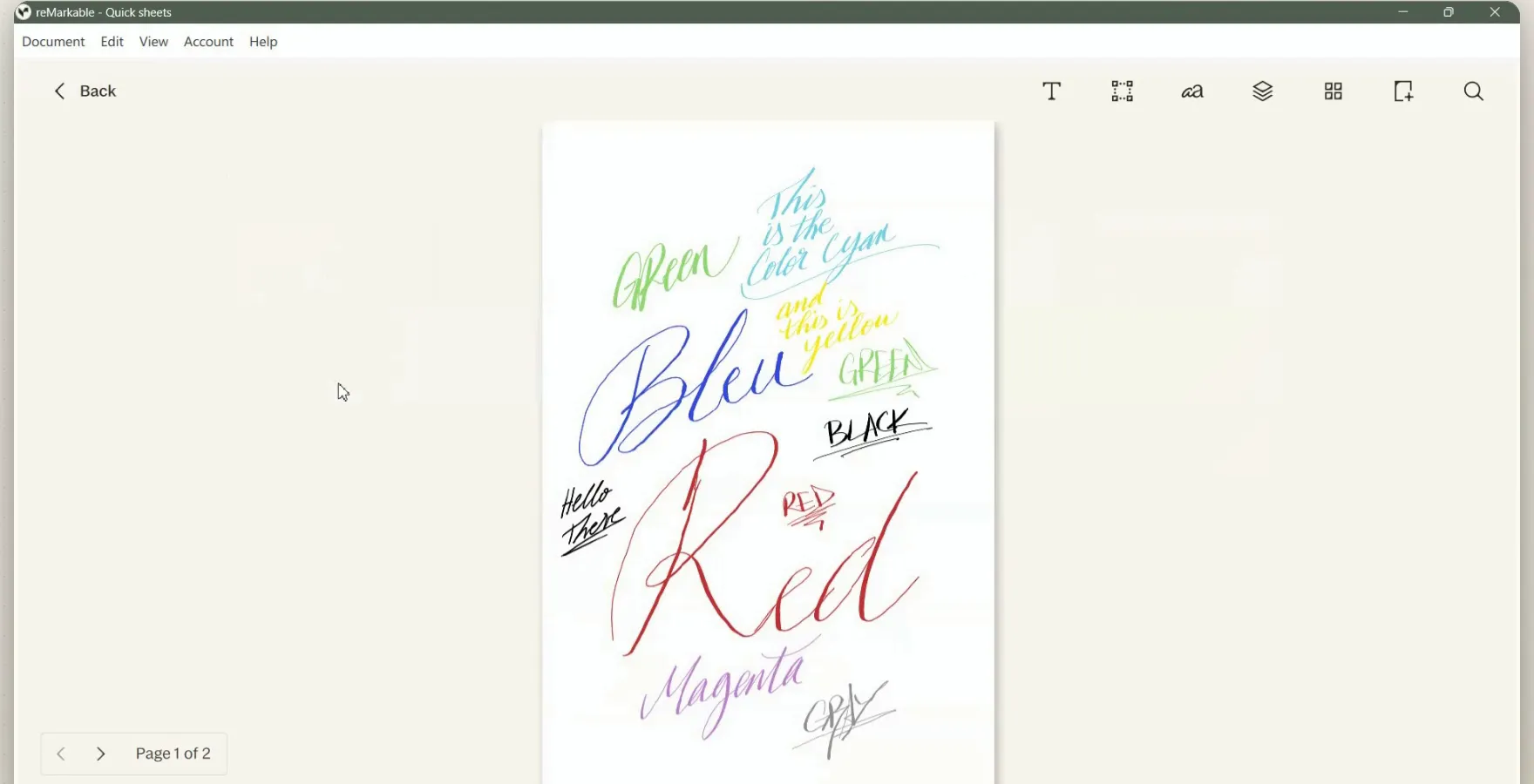
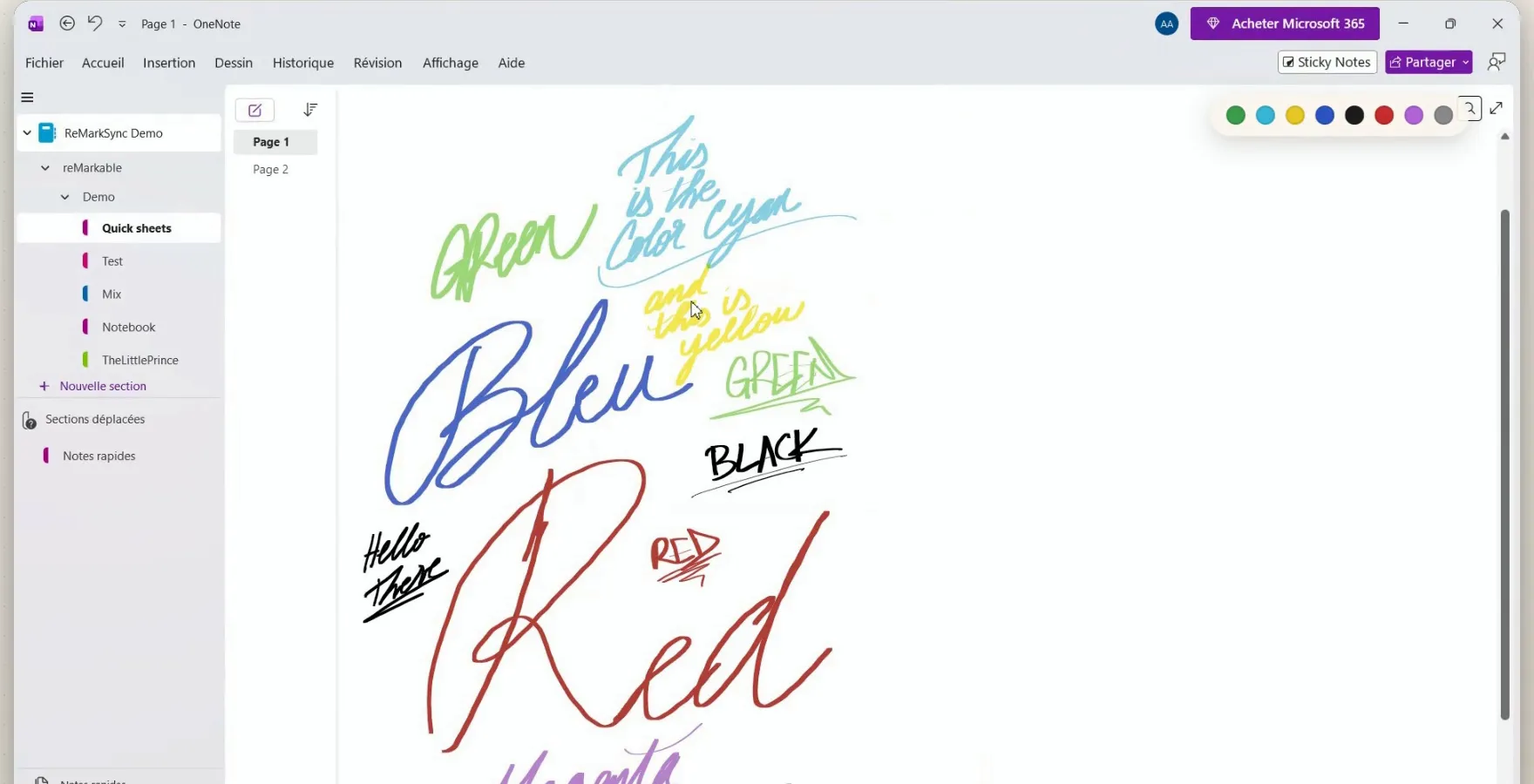
Each stroke stays a stroke, in its own color. Click one in OneNote to select, move or recolor it.
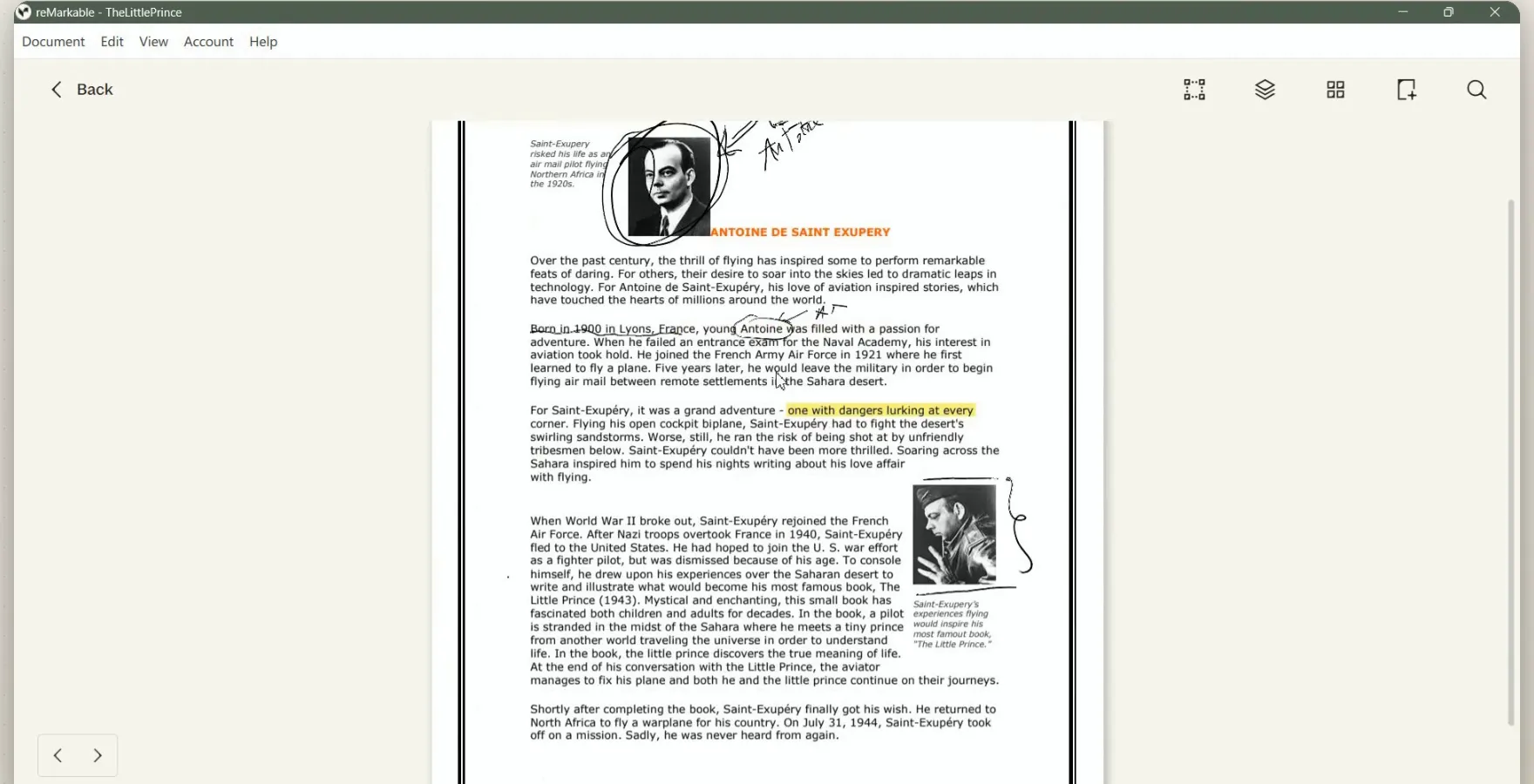
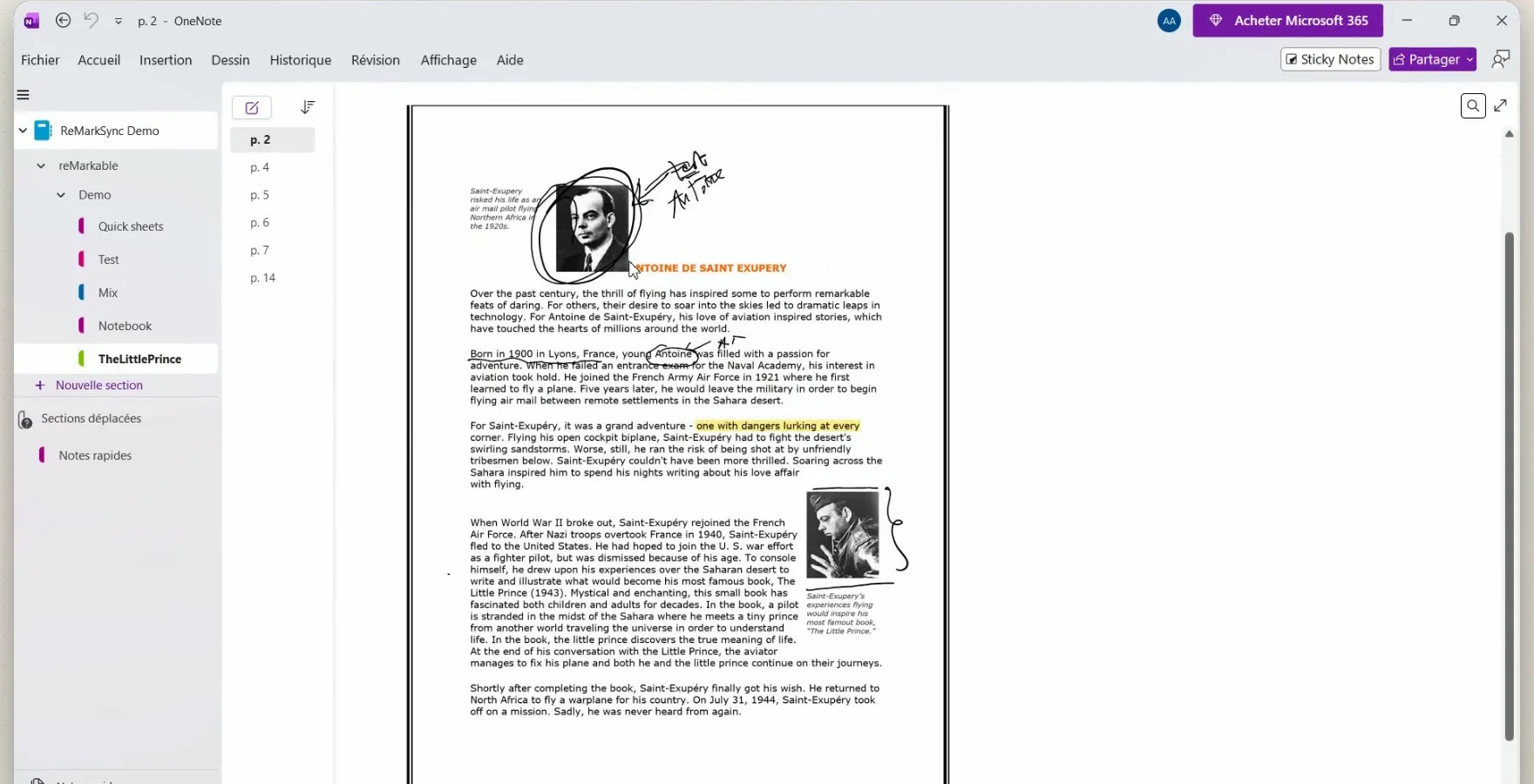
The PDF page stays as it is, and your pen notes sit on top as ink. Highlights on PDF pages become part of the page image.
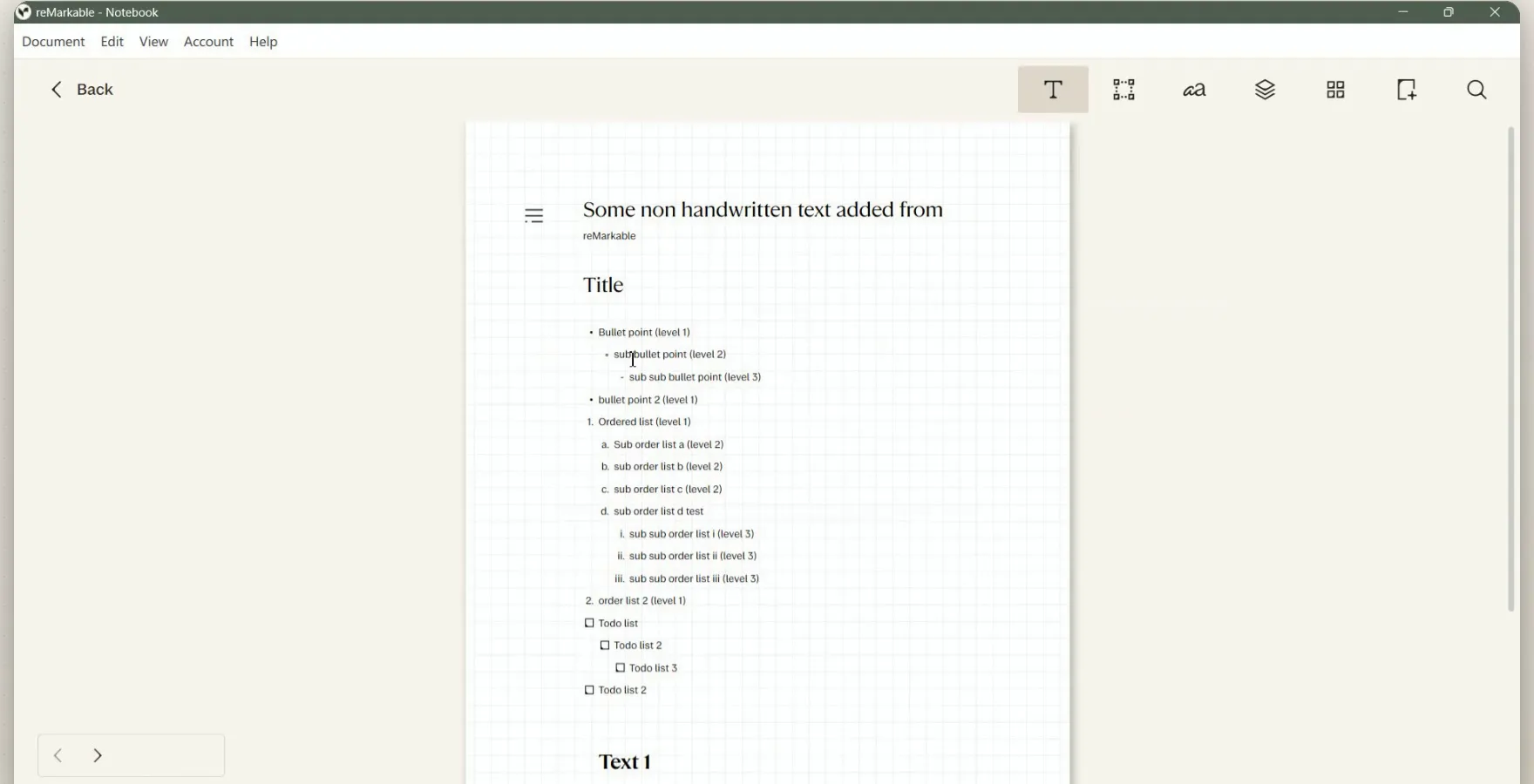
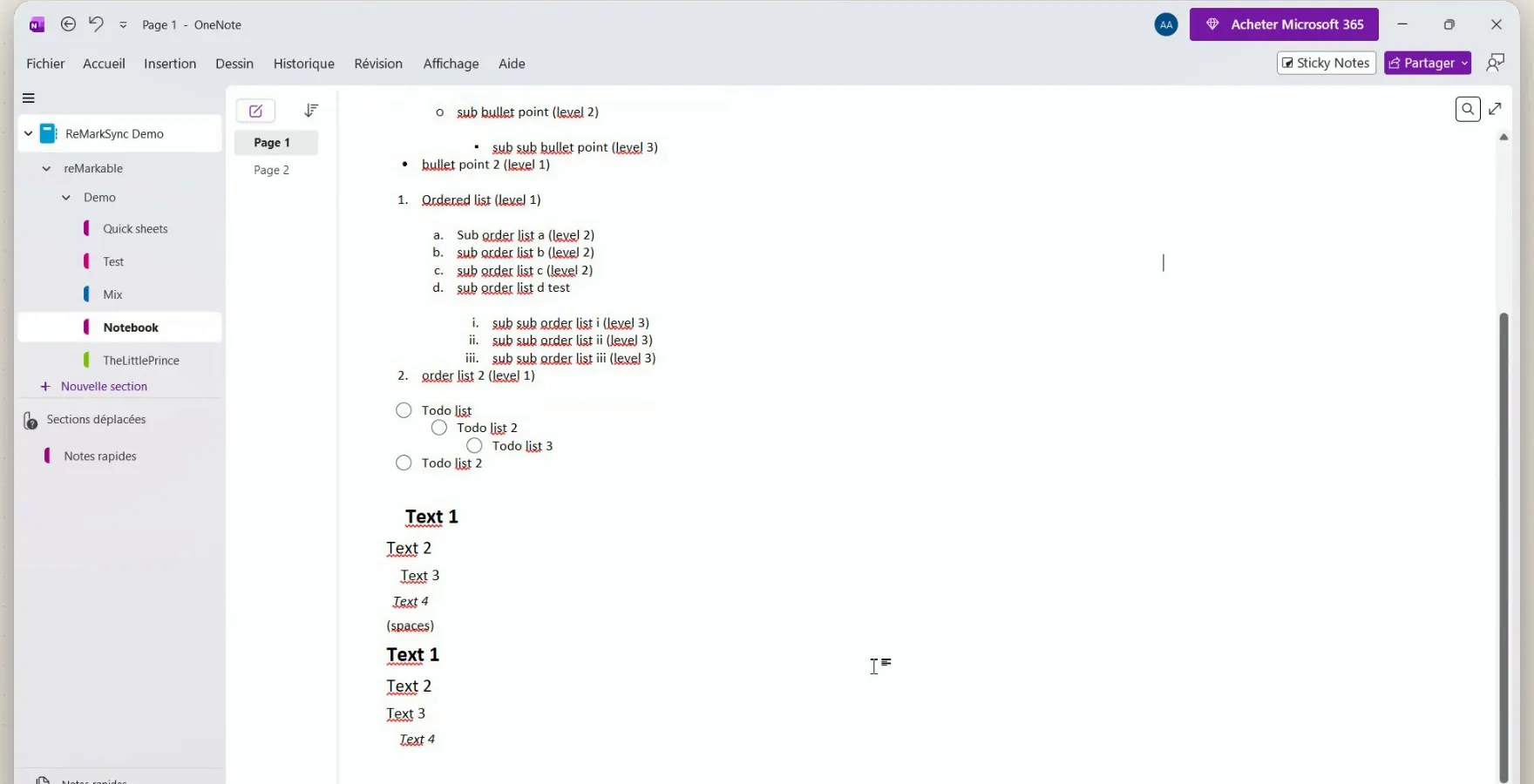
Headings, bullets, numbered lists and to-dos arrive as real OneNote text you can edit and search.
More than real ink
ReMarkSync brings the whole page, runs by itself, and is careful with your notes. Each point below comes from the User Guide and the FAQ.
1 · Everything on the page arrives
Ink, PDF notes, text and folders
- Real ink in your pen colors, Paper Pro custom colors too.
- Annotated PDFs: the original page stays, and your pen notes sit on top as ink.
- Typed text stays text: headings, lists and to-dos you can edit and search.
- Your folders stay organized: folders become section groups, notebooks become sections.
2 · It runs by itself
New pages come along automatically
- Syncs when your notes change. No button to press. Unchanged pages are skipped.
- Auto for new notes: pick a notebook once, and its new pages are included. Turn it on for a folder or for all notes if you like.
- Long pages fit: a page too big for OneNote is split for you.
- Nothing on the tablet: no developer mode, no SSH, nothing to redo after an update.
3 · It takes care of your notes
Retries and recovers on its own
- Unfinished uploads are tried again, after a dropped connection or a restart.
- No duplicates: if OneNote's answer is unclear, the page is protected instead of copied twice.
- The latest version wins: if a page changes during an upload, the newest one is saved.
- You stay in control: archive, keep or delete removed pages. Activity shows every sync.
- Private by design: pages go from your computer straight to Microsoft, never through our servers.
How ReMarkSync gets your notes into OneNote
Follow one page from your tablet to OneNote. It never passes through ReMarkSync’s servers.
- InstalledNothing on the tablet. ReMarkSync runs on your Windows PC or Mac, next to the reMarkable desktop app.
- Sign-inYou sign in with Microsoft. ReMarkSync never sees your Microsoft password.
- In OneNoteYour pages land in a reMarkable section group inside the notebook you pick.
Set it up once, in four steps
Setup usually takes about three minutes.
Install ReMarkSync
From the Microsoft Store on Windows, or the download for Mac. It finds your reMarkable library by itself.
Sign in to Microsoft
A personal account, or a work or school account. At work, your IT may need to approve.
Pick a OneNote notebook
ReMarkSync adds a reMarkable section group to it after the first sync.
Choose what syncs
Notebooks, folders, PDFs or single pages. Anything you leave out stays on the reMarkable only.
Then start your 7-day free trial, no card required. The User Guide shows each screen.
Which way fits you?
Pick what you need most.
Questions people ask
Can I install OneNote on my reMarkable?
No. reMarkable tablets have no app store, so OneNote cannot run on the tablet. You write on the reMarkable and move your notes into OneNote on a computer, using one of the options on this page.
Can I still email notes to me@onenote.com?
No. Microsoft retired the email to OneNote address on 26 March 2025. You can still email a page to your own Outlook mailbox and use Send to OneNote, one email at a time.
Which reMarkable tablets work with ReMarkSync?
reMarkable 2, reMarkable Paper Pro, Paper Pro Move and Paper Pure, as long as your notes appear in the official reMarkable desktop app on your Windows PC or Mac.
Is my handwriting searchable in OneNote?
Yes, if you turn on handwriting search for a notebook in ReMarkSync v0.6.0 or later. Handwriting still arrives as OneNote ink, and OneNote search then finds most handwritten English words, dates, times and prices, though not every word. Typed text is always searchable.
Try ReMarkSync free
Your reMarkable notes, automatically in OneNote, with handwriting kept as real ink. For Windows and macOS.
7 days free · No card required · View plans