
Article · OneDrive or OneNote
reMarkable OneDrive integration vs OneNote sync: what is the difference?
Short answer
reMarkable can save a PDF copy of a notebook to OneDrive each time you tap Export. It is free and needs no Connect subscription, but the copy never updates. Syncing to OneNote is different: ReMarkSync keeps the notebooks you choose up to date in OneNote by itself, with your handwriting as real ink.
What the OneDrive integration does
reMarkable can connect to OneDrive, Google Drive and Dropbox. You link OneDrive once at my.remarkable.com, under Integrations. After that, it works both ways:
- Link once at my.remarkable.com
- No Connect subscription needed
- Work account: can reach SharePoint, IT may need to approve
To export, press and hold a notebook on the tablet, choose Export, then OneDrive. reMarkable saves a PDF of it in your OneDrive.
A copy in a folder, or a page that keeps up
The difference shows over a few days, like in the week at the top of this page. Every export makes a new PDF file, and none of them change when you keep writing. With OneNote sync, there is one page that follows your reMarkable: write a new line, and the same page in OneNote gets it too.
That matters if you organize your notes in OneNote, share a notebook with colleagues, or keep project pages that grow over weeks.
Side by side
- What you get
- OneDrive export: A PDF file in a folder
- OneNote sync with ReMarkSync: A page in your OneNote notebook
- When it updates
- OneDrive export: Never: export again for a new copy
- OneNote sync with ReMarkSync: When your notes change, by itself
- Your handwriting
- OneDrive export: A picture of each page
- OneNote sync with ReMarkSync: Real ink you can edit
- PDFs you annotate
- OneDrive export: As a flat PDF
- OneNote sync with ReMarkSync: Your notes on top, as ink
- Work accounts
- OneDrive export: If your IT allows it
- OneNote sync with ReMarkSync: Yes, IT may need to approve
- You need
- OneDrive export: To link it once at my.remarkable.com
- OneNote sync with ReMarkSync: ReMarkSync on your Windows PC or Mac
- Cost
- OneDrive export: Free
- OneNote sync with ReMarkSync: 7 days free, then $4.99/month, or $49 the first year and $59/year after
Show the full table
| Option | Automatic | Handwriting stays editable ink | Annotated PDFs | Computer | Work or school accounts | Cost |
|---|---|---|---|---|---|---|
| OneDrive exportBuilt into reMarkable | No, one file at a time | No, a flat PDF | As a flat PDF | Any, then insert in OneNote | If your IT allows it | Free |
| ReMarkSyncDesktop app (this site) | Yes, when notes change | Yes, real OneNote ink | Yes, ink on top of the page | Windows and macOS | Yes, IT may need to approve | 7 days free, then $4.99/month, or $49 the first year and $59/year after |
OneDrive export
Built into reMarkable
- Automatic
- No, one file at a time
- Handwriting stays editable ink
- No, a flat PDF
- Annotated PDFs
- As a flat PDF
- Computer
- Any, then insert in OneNote
- Work or school accounts
- If your IT allows it
- Cost
- Free
ReMarkSync
Desktop app (this site)
- Automatic
- Yes, when notes change
- Handwriting stays editable ink
- Yes, real OneNote ink
- Annotated PDFs
- Yes, ink on top of the page
- Computer
- Windows and macOS
- Work or school accounts
- Yes, IT may need to approve
- Cost
- 7 days free, then $4.99/month, or $49 the first year and $59/year after
What arrives in OneNote
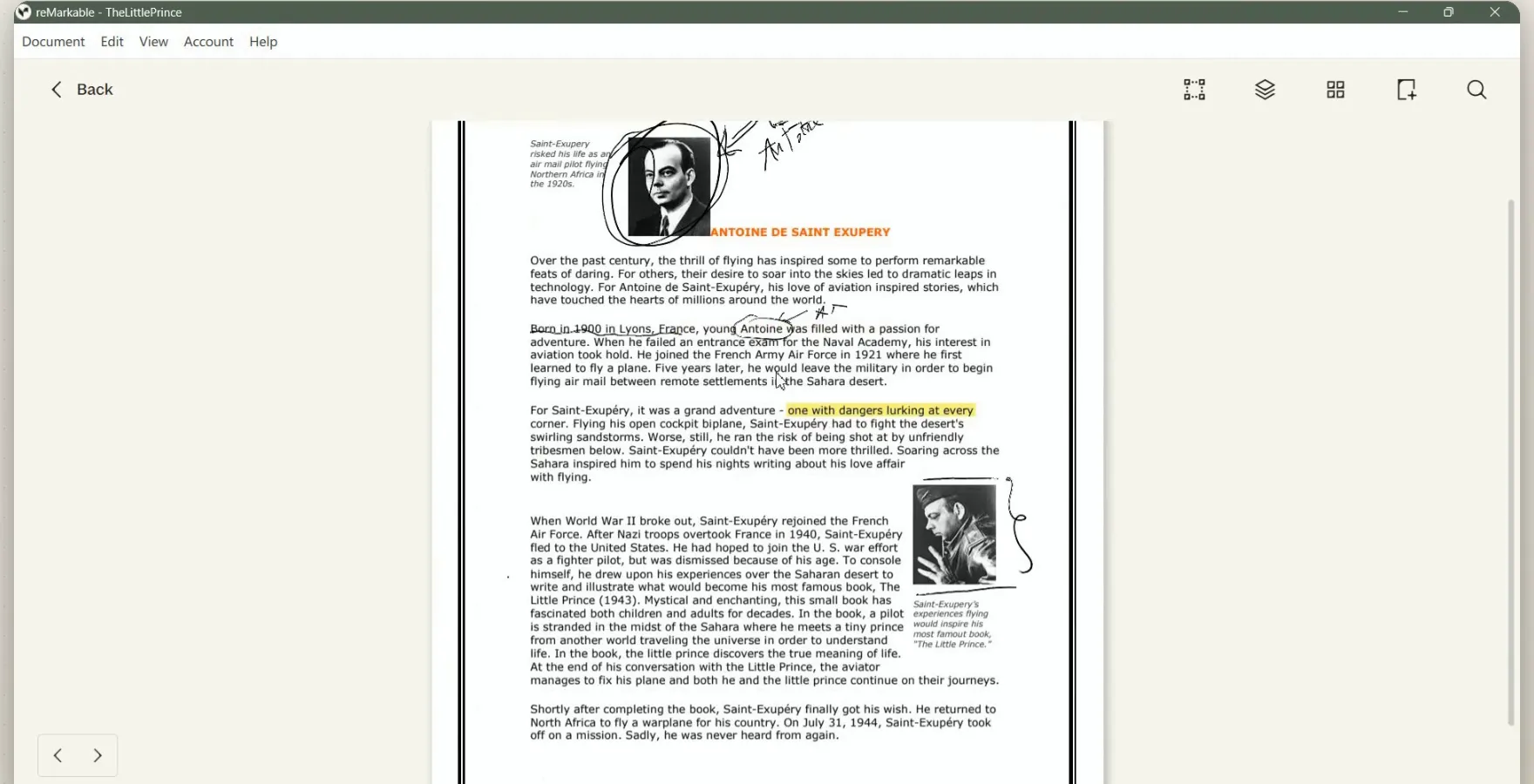
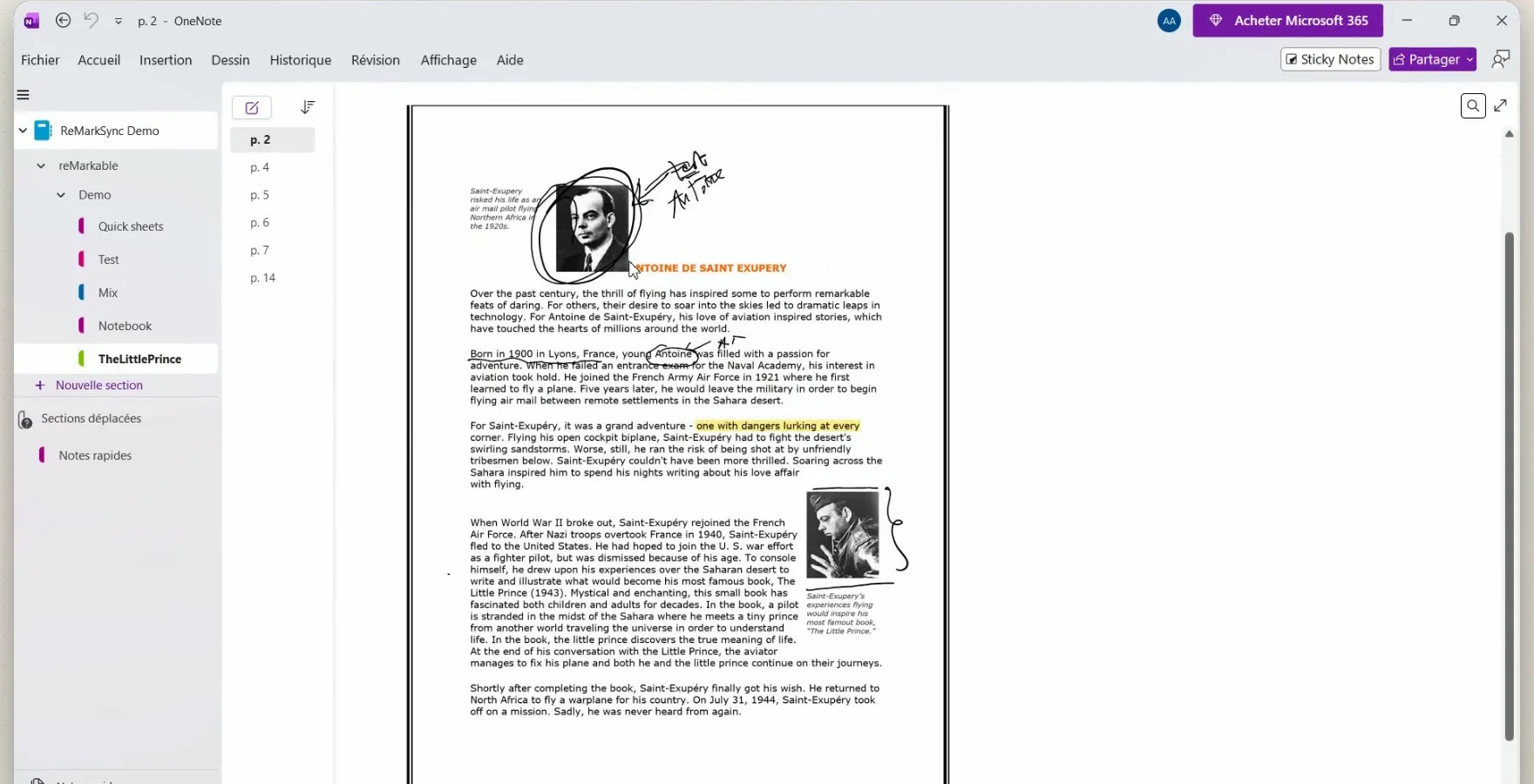
An exported PDF lands in OneNote as a picture of each page. With ReMarkSync, an annotated PDF keeps its page as it is, and your pen notes sit on top as ink you can still change.
On your reMarkable
In OneNote, after ReMarkSync
Which one fits you?
When OneDrive export is enough
- You need a page now and then, for example to send a PDF to someone.
- You want an archive of finished notebooks, not a living copy.
- You read and annotate PDFs that already live in OneDrive.
When OneNote sync is the better fit
- Your notes live in OneNote and you want new pages to show up by themselves.
- You edit, move or share your handwritten notes in OneNote.
- You annotate lecture slides or reports and want them next to the rest of your notes.
Can you use both?
Yes. They do not get in each other’s way. Keep OneDrive for sharing PDFs and bringing documents to the tablet, and use ReMarkSync to keep your notebooks in OneNote. ReMarkSync does not need the OneDrive link to work.
Questions people ask
Does reMarkable sync to OneDrive automatically?
No. reMarkable saves a PDF to OneDrive only when you export a notebook or page. Changes you make on the tablet later do not update that PDF; you export again to get a new copy.
Do I need a Connect subscription for OneDrive?
No. As of October 2026, reMarkable lists OneDrive, Google Drive and Dropbox among the features that work without Connect. Within the integrations, only turning Word or text files into editable notebooks needs Connect.
Can OneNote open the PDFs I export to OneDrive?
Yes. You can insert the PDF into a OneNote page, for example as a printout on Windows. Each page arrives as a picture: you can write over it, but you cannot edit the original strokes.
Does ReMarkSync use my OneDrive?
No. ReMarkSync reads the notes that the reMarkable desktop app keeps on your computer and sends them straight to the OneNote notebook you choose. You do not need to connect OneDrive on the tablet.
Try ReMarkSync free
Your reMarkable notes, automatically in OneNote, with handwriting kept as real ink. For Windows and macOS.
7 days free · No card required · View plans